Messing Around with Collections in C# to Silence CA1002 Warnings
CA1002; Some developers would rather just return a List<T>. In a nutshell: return Collection<T> from any public method if you are returning a collection (little c) of things!
But, List<T> works faster… and it has methods like Sort(), and Find()!
If you are reading this, by now you have probably read Stackoverflow articles such as this one:
C#: Difference between List<T> and Collection<T> (CA1002, Do not expose generic lists)
I am not going to argue the case of Collection<T> vs. List<T>. I want to find a practical way to code better and not get the warning without suppressing it. Consider this case:
public IEnumerable&amp;amp;lt;int&amp;amp;gt; MyMethod()
{
List&amp;amp;lt;int&amp;amp;gt;; myList = new List&amp;amp;lt;int&amp;amp;gt;()
for (int (i) = 0; (i) &amp;amp;amp;lt;= 1000000; (i)++)
{
myList.Add(i);
}
return myList;
}
Visual Studio Code Analysis will not give a CA1002 when we build this. The List<T> is scoped within the method and we are returning IEnumerable<T>.
For most shops where the code is known by all, and never used or looked at outside the shop, I guess the above would work? Seems plausible. But, we cannot enhance it later down the road if we needed to. Say, for example, we needed to raise an event that the list was changed somehow. As a developer friend used to say: “It makes me feel dirty.” Feelings aside, the recommendation is to return a Collection, as it is extensible and will not break any older code.
Personally, I don’t feel real good about leaving it like that. I feel the need to refactor that further and have it be more universal. From Martin Fowler’s “Refactoring” book, we learn that the main reasons to refactor is to make our code manageable/extensible, and readable. The exception would be to increase performance. So, do we have a performance issue here?
While the example above might be faster in execution, we tested it out with ticks, and for a million records the difference was 809000 ticks on average (returning Collection) vs. 799000 ticks on average (returning IEnumerable).
So, performance not really being an issue here, let’s say we follow good refactoring principles to make our code more readable, and maintainable/extensible.
The simplest solution:
public Collection&amp;amp;lt;int&amp;amp;gt; MyMethod()
{
List&amp;amp;lt;int&amp;amp;gt; myList = new List&amp;amp;lt;int&amp;amp;gt;()
for (int (i) = 0; (i) &amp;amp;amp;lt;= 1000000; (i)++)
{
myList.Add(i);
}
return new Collection&amp;amp;lt;int&amp;amp;gt;(myList);
}
Perhaps for 99 percent(?) of what we do that would be ok. So, why are we doing this?
- We aren’t getting a CA1002 warning.
- We are returning a Collection, so if we decide to extend/enhance/soup up the collection, we will not be breaking any other calling code later.
- We are not exposing extraneous methods associated with a List<T> (look up the methods in List vs Collection on MSDN)
More explanation:
Some of you will be asking why, or when do we need to soup up Collection<T>? How do we do that?
Some will ask how can we get cool methods List<T> has like Sort() or Find() in this “Collection”?
How can you do both with a Collection<T>? How can you write good, readable, maintainable code and add functionality like Sort() and Find() later, without breaking code that calls this?
Some of the methods in the System.Collections.ObjectModel.Collection<T> are virtual. So if we have our new Collection inherit from Collection, we can override those methods. We can also add our own methods and properties to our new Collection class if we wanted. Since such a class would inherit from Collection<T>, any existing code expecting a return type Collection<T> would not break and continue to operate, and newer code can take advantage of new features.
For example: Let us assume we want the code using our new Collection class to get notified when the Collection is changed. This seems like a more practical reason why we would want to extend the behavior of the .Net Collection class. A use case for this might be a data broker service where many different branch companies may be sending data in to be acted upon, and you need to audit the collection items as the collection changes, or your company is cyber security aware and implements layers of data security, validation, etc… in the UI, code, and database, and as the state of the collection changes, you need to ensure data is valid, not tampered with, audited, etc…
Looking at the source code for Collection we notice, that we can override the following in any custom class we create that inherits System.Collections.ObjectModel.Collection<T>:
- protected virtual void ClearItems()
- protected virtual void InsertItem(int index, T item)
- protected virtual void RemoveItem(int index)
- protected virtual void SetItem(int index, T item)
We also note that “items” in the Collection class is declared as:
IList&amp;amp;lt;T&amp;amp;gt;; items;
And the default constructor for a Collection class is:
public Collection() {
items = new List&amp;amp;lt;T&amp;amp;gt;();
}
The Collection<T> class, internally by default uses a List. It is a wrapper class around a List, allowing us a clean way to use the framework to extend a list!
And the overridable methods listed above, all act on, you guessed it: the IList items!
The other constructor in the Collection<T> class is:
public Collection(IList&amp;amp;lt;T&amp;amp;gt; list) {
if (list == null) {
ThrowHelper.ThrowArgumentNullException(ExceptionArgument.list);
}
items = list;
}
We can conclude, that the Collection class will internally use anything that implements the IList interface. For simplicity, assume we have a Person:
namespace CollectionsExamples
{
using System;
public class Person
{
public string LastName { get; set; }
public string FirstName { get; set; }
public Person(string lastName, string firstName)
{
this.LastName = lastName;
this.FirstName = firstName;
}
public override string ToString()
{
return string.Format(&amp;amp;quot;Person: {0} LastName: {1}, FirstName: {2} {3}&amp;amp;quot;, &amp;amp;quot;{&amp;amp;quot;, this.LastName, this.FirstName, &amp;amp;quot;}&amp;amp;quot;);
}
}
}
And assume a class of People as follows:
namespace CollectionExample.Model
{
using System;
using System.Collections.Generic;
public class People
{
private IList&amp;amp;lt;Person&amp;amp;gt; people;
public People()
{
this.people = new List&amp;amp;lt;Person&amp;amp;gt;();
}
public People(IList&amp;amp;lt;Person&amp;amp;gt; list)
{
if (list == null)
{
throw new ArgumentNullException(&amp;amp;quot;list&amp;amp;quot;);
}
this.people = list;
}
public List&amp;amp;lt;Person&amp;amp;gt; RetrieveAllPeople()
{
if (this.people == null)
{
this.people = new List&amp;amp;lt;Person&amp;amp;gt;();
}
if(this.people.Count == 0)
{
this.people.Add(new Person(&amp;amp;quot;Simpson&amp;amp;quot;, &amp;amp;quot;Homer&amp;amp;quot;));
this.people.Add(new Person(&amp;amp;quot;Bond&amp;amp;quot;, &amp;amp;quot;James&amp;amp;quot;));
}
return (List&amp;amp;lt;Person&amp;amp;gt;)this.people;
}
}
}
When we build this code we get the CA1002 warning:

This being our first version of the code we decide to return a collection, as follows:
public Collection&amp;amp;lt;Person&amp;amp;gt; RetrieveAllPeople()
{
if (this.people == null)
{
this.people = new List&amp;amp;lt;Person&amp;amp;gt;();
}
if(this.people.Count == 0)
{
this.people.Add(new Person(&amp;amp;quot;Simpson&amp;amp;quot;, &amp;amp;quot;Homer&amp;amp;quot;));
this.people.Add(new Person(&amp;amp;quot;Bond&amp;amp;quot;, &amp;amp;quot;James&amp;amp;quot;));
}
return new Collection&amp;amp;lt;Person&amp;amp;gt;(this.people);
}
We do not get a CA1002 warning. Now we will use this in a program. I am curious if our collection is initializing it’s internal List<T> by reference or value? We will test that out in our program below:
using System;
using System.Collections.Generic;
using System.Collections.ObjectModel;
using CollectionExample.Model;
[assembly: CLSCompliant(true)]
namespace CollectionExample
{
class Program
{
static void Main()
{
Collection&amp;amp;lt;Person&amp;amp;gt; moviePeople = new People().RetrieveAllPeople();
Display(moviePeople);
List&amp;amp;lt;Person&amp;amp;gt; otherPeople = new List&amp;amp;lt;Person&amp;amp;gt;();
foreach(Person p in moviePeople)
{
otherPeople.Add(p);
}
Collection&amp;amp;lt;Person&amp;amp;gt; otherMoviePeople = new Collection&amp;amp;lt;Person&amp;amp;gt;(otherPeople);
otherMoviePeople.Add(new Person(&amp;amp;quot;Underwood&amp;amp;quot;, &amp;amp;quot;Frank&amp;amp;quot;));
Display(otherPeople);
Console.Read();
}
private static void Display(IList&amp;amp;lt;Person&amp;amp;gt; people)
{
Console.WriteLine(&amp;amp;quot;{0} Displaying people:&amp;amp;quot;, Environment.NewLine);
foreach(Person p in people)
{
Console.WriteLine(&amp;amp;quot; - {0}&amp;amp;quot;, p.ToString());
}
Console.WriteLine(&amp;amp;quot; ==== End of List ====&amp;amp;quot;);
}
}
}
We will now run this “Version 1.0” program:

Notice, in the second display that what you are seeing is the contents of the List<Person> otherPeople. This lets you know that when you create a new instance on a Collection<T> by passing a List<T> in the constructor, that it is done by reference.
Now, a new program has a need to know when the collection changes. We need a new “enhanced” collection that will raise some sort of “change” event the program can handle as it sees fit. The second requirement of this new program is that it needs to sort the collection after it is changed. To recap, two requirements:
- Fire a change event when the collection is changed.
- Sort the collection.
Let’s make some changes to our classes.
In preparation of being able to sort the collection of Person objects, let’s have the Person class implement IComparable, ignoring the overrides to the =, <, >, != for less code clutter in the example:
namespace CollectionExample.Model
{
using System;
public class Person : IComparable&amp;amp;lt;Person&amp;amp;gt;
{
public string LastName { get; set; }
public string FirstName { get; set; }
public Person(string lastName, string firstName)
{
LastName = lastName;
FirstName = firstName;
}
public override string ToString()
{
return string.Format(&amp;amp;quot;Person: {0} LastName: {1}, FirstName: {2} {3}&amp;amp;quot;, &amp;amp;quot;{&amp;amp;quot;, this.LastName, this.FirstName, &amp;amp;quot;}&amp;amp;quot;);
}
public int CompareTo(Person other)
{
int lastNameToOtherResult = this.LastName.CompareTo(other.LastName);
int firstNameToOtherResult = this.FirstName.CompareTo(other.FirstName);
if (lastNameToOtherResult != 0)
{
return lastNameToOtherResult;
}
if (firstNameToOtherResult != 0)
{
return firstNameToOtherResult;
}
return 0;
}
}
}
And a new class that inherits from Collection<T> named PersonCollection:
namespace CollectionExample.Model
{
using System;
using System.Collections.Generic;
using System.Collections.ObjectModel;
public class PersonCollection : Collection&amp;amp;lt;Person&amp;amp;gt;
{
public PersonCollection() : base()
{
}
public PersonCollection(IList&amp;amp;lt;Person&amp;amp;gt; people)
: base(people)
{
}
public event EventHandler&amp;amp;lt;PersonCollectionChangedEventArgs&amp;amp;gt; Changed;
public void Sort()
{
List&amp;amp;lt;Person&amp;amp;gt; items = (List&amp;amp;lt;Person&amp;amp;gt;)Items;
items.Sort();
}
protected override void InsertItem(int index, Person item)
{
if (item == null)
{
throw new ArgumentNullException(&amp;amp;quot;item&amp;amp;quot;);
}
base.InsertItem(index, item);
EventHandler&amp;amp;lt;PersonCollectionChangedEventArgs&amp;amp;gt; temp = this.Changed;
if (temp != null)
{
temp(this, new PersonCollectionChangedEventArgs(CollectionOperation.Add, item.ToString(), null));
}
}
protected override void SetItem(int index, Person item)
{
if (item == null)
{
throw new ArgumentNullException(&amp;amp;quot;item&amp;amp;quot;);
}
Person replaced = Items[index];
base.SetItem(index, item);
EventHandler&amp;amp;lt;PersonCollectionChangedEventArgs&amp;amp;gt; temp = this.Changed;
if (temp != null)
{
temp(this, new PersonCollectionChangedEventArgs(CollectionOperation.Update, replaced.ToString(), item.ToString()));
}
}
protected override void ClearItems()
{
base.ClearItems();
EventHandler&amp;amp;lt;PersonCollectionChangedEventArgs&amp;amp;gt; temp = this.Changed;
if (temp != null)
{
temp(this, new PersonCollectionChangedEventArgs(CollectionOperation.Clear, null, null));
}
}
protected override void RemoveItem(int index)
{
Person removedItem = Items[index];
base.RemoveItem(index);
EventHandler&amp;amp;lt;PersonCollectionChangedEventArgs&amp;amp;gt; temp = this.Changed;
if (temp != null)
{
temp(this, new PersonCollectionChangedEventArgs(CollectionOperation.Remove, removedItem.ToString(), null));
}
}
}
}
We will need to add some additional classes to help out. An enum to define the type of operations on our collection, and some event arguments to pass when invoking an event when our collection changes. First the collection operation, then the change event arguments:
namespace CollectionExample.Model
{
public enum CollectionOperation
{
/// &amp;amp;lt;summary&amp;amp;gt;
/// An add item to collection operation.
/// &amp;amp;lt;/summary&amp;amp;gt;
Add,
/// &amp;amp;lt;summary&amp;amp;gt;
/// A remove item from collection operation.
/// &amp;amp;lt;/summary&amp;amp;gt;
Remove,
/// &amp;amp;lt;summary&amp;amp;gt;
/// Update an item in the collection operation.
/// &amp;amp;lt;/summary&amp;amp;gt;
Update,
/// &amp;amp;lt;summary&amp;amp;gt;
/// Clear the collection operation.
/// &amp;amp;lt;/summary&amp;amp;gt;
Clear
}
}
And the event argument:
namespace CollectionExample.Model
{
    using System;

    public class PersonCollectionChangedEventArgs : EventArgs
    {
        private string item;
        private CollectionOperation changeType;
        private string replacement;

        public string Item
        {
            get { return item; }
        }

        public CollectionOperation ChangeType
        {
            get { return changeType; }
        }

        public string Replacement
        {
            get { return replacement; }
        }

        public PersonCollectionChangedEventArgs(CollectionOperation changeType, string item, string replacement)
        {
            this.item = item;
            this.changeType = changeType;
            this.replacement = replacement;
        }
    }
}
We make a small change to our people class, to return our enhanced PeopleCollection class:
public PersonCollection RetrieveAllPeople()
{
if (this.people == null)
{
this.people = new List&amp;amp;amp;lt;Person&amp;amp;amp;gt;();
}
if(this.people.Count == 0)
{
this.people.Add(new Person(&amp;amp;quot;Simpson&amp;amp;quot;, &amp;amp;quot;Homer&amp;amp;quot;));
this.people.Add(new Person(&amp;amp;quot;Bond&amp;amp;quot;, &amp;amp;quot;James&amp;amp;quot;));
}
return new PersonCollection(this.people);
}
Now we add our second program that utilizes the new “enhanced” PersonCollection. Will we need to make any changes to the first program now that our library is updated? We run the first program as is with no changes and get:

Same results as the first time. And what about our new program? What can it do? Let’s look at the code:
using System;
using System.Collections.Generic;
using CollectionExample.Model;
[assembly: CLSCompliant(true)]
namespace PersonCollectionConsoleApplication
{
class Program
{
static void Main()
{
PersonCollection moviePeople = new People().RetrieveAllPeople();
moviePeople.Changed += People_Changed;
Display(moviePeople);
moviePeople.Add(new Person(&amp;amp;quot;Mouse&amp;amp;quot;, &amp;amp;quot;Mickey&amp;amp;quot;));
moviePeople.Sort();
Display(moviePeople);
Console.Read();
}
protected static void People_Changed(object sender, PersonCollectionChangedEventArgs e)
{
Console.Write(&amp;amp;quot;{0} -- Change Detected: &amp;amp;quot;, Environment.NewLine);
switch (e.ChangeType)
{
case CollectionOperation.Add:
Console.WriteLine(&amp;amp;quot;{0} was added.{1}&amp;amp;quot;, e.Item, Environment.NewLine);
break;
case CollectionOperation.Remove:
Console.WriteLine(&amp;amp;quot;{0} was removed.{1}&amp;amp;quot;, e.Item, Environment.NewLine);
break;
case CollectionOperation.Update:
Console.WriteLine(&amp;amp;quot;{0} was replaced with {1}.{2}&amp;amp;quot;, e.Item, e.Replacement, Environment.NewLine);
break;
case CollectionOperation.Clear:
Console.WriteLine(&amp;amp;quot;people was cleared.{0}&amp;amp;quot;, Environment.NewLine);
break;
default:
Console.WriteLine(&amp;amp;quot;Error: Unknown Operation.{0}&amp;amp;quot;, Environment.NewLine);
break;
}
}
private static void Display(IList&amp;amp;lt;Person&amp;amp;gt; people)
{
Console.WriteLine(&amp;amp;quot;{0} Displaying PersonCollection people:&amp;amp;quot;, Environment.NewLine);
foreach (Person p in people)
{
Console.WriteLine(&amp;amp;quot; - {0}&amp;amp;quot;, p.ToString());
}
Console.WriteLine(&amp;amp;quot; ==== End of List ====&amp;amp;quot;);
}
}
}
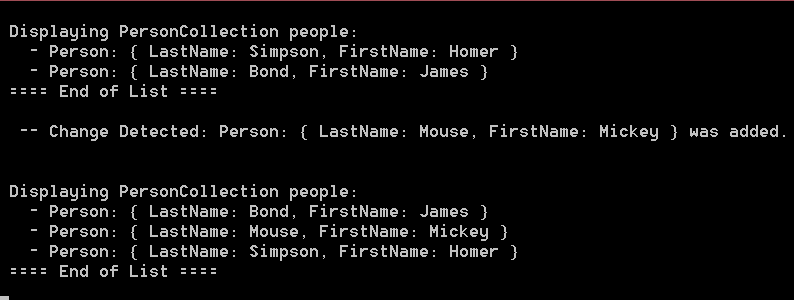
We have new capabilities in this program:
- We can handle changes to the collection.
- We can sort the collection.
And what does this all look like:
In conclusion, we have shown the following:
- Simplest fix to CA1002: change the return type to Collection<T>.
- Later if you decide to enhance the returned Collection<T> you can do so without affecting prior callers of the method.
Babylon JS
Filed under: Frameworks | Tags: Animation, Babylon JS, JavaScript, WebGL
 Leave a Comment
 Can’t say I was impressed. I understand it is in JS and WebGL what Flash is to the browser. Not bad though for smaller, simpler animated projects.
Of the 3 examples on their site (http://www.babylonjs.com), Mansion did not run, Dino hunt was OK, but poorly designed (not Babylon’s fault!), Retail, lagged and would not work at times. I accessed them using Safari Version 8.0 (10600.1.25) on Mac OS X Yosemite 10.10, Intel Graphics Iris 1536 MB.
Looks like it still needs some work.
I believe the potential here is great as an alternative to Flash for new developers. However, when one considers the large established base of Flash developers, IMHO, it will be on the scale of years before we see wide-scale use. At best, for smaller animated projects, it’s not bad (like the Dino Hunt).
I’ll have to re-visit in a year and compare what I see then, with what I’ve written here. Reminder set.
Simple “Hello World” Javascript Test Driven Development (TDD) Example Using QUnit
I’ve been meaning to try out Javascript TDD. So, here goes.
Premise: We want to develop a simple Javascript object that will contain an ID and a Title. When developed, we will use it in our web page Index.html.
- Download QUnit from: http://qunitjs.com
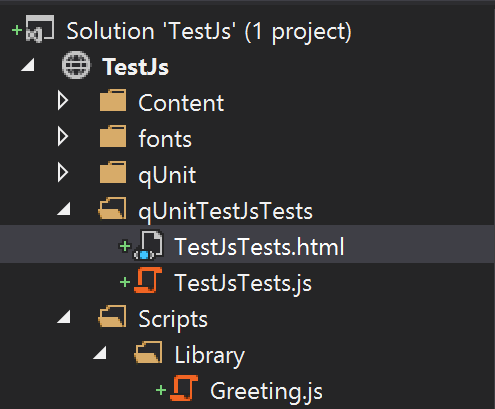
- I placed the unit testing artifacts in their own folder.

Figure 1 – Unit Test Folder Structure
- The bare minimum needed by QUnit in the TestJsTests.html file:
<!DOCTYPE html> <html xmlns="http://www.w3.org/1999/xhtml"> <head> <meta charset="utf-8" /> <title>Javascript Unit Testing Using QUnit</title> <link href="../qUnit/qunit-1.17.1.css" rel="stylesheet" /> </head> <body> <div id="qunit"></div> <div id="qunit-fixture"></div> <script src="../qUnit/qunit-1.17.1.js"></script> <script src="TestJsTests.js"></script> </body> </html> - Time to setup the test we know will fail. Adding code to TestJsTests.js. The idea is to define a class “Greeting” with two properties: “Id”, and “Title”. We will write our initial test, as if the class with these properties exists.
/// <reference path="../qUnit/qunit-1.17.1.js" /> /* globals QUnit, Greeting */ QUnit.test('Greeting Test', function(assert) { 'use strict'; assert.expect(2); var x = Greeting(1, 'Hello World'); assert.ok(x.Id === 1, 'Id property passed!'); assert.deepEqual(x.Title, 'Hello World', 'Title property passed!'); }); - As expected, the tests fail. (Note: there seems to be a layout bug in QUnit as we have a bit of runoff indicated by the blue arrow). This is good, we want it to fail so we can have a developer write the barest of minimum Javascript code needed to make the unit tests pass.

First Unit Test
- Proceeding with developing Greeting.js.

Greeting.js folder structure.
- Code for Greeting.js.
/* exported Greeting */ var Greeting = (function () { 'use strict'; var p = function (id, title) { this.Id = id; this.Title = title; }; return p; })(); - Updating the TestJsTests.html to include the Greeting.js code.
<body> <div id="qunit"></div> <div id="qunit-fixture"></div> <script src="../qUnit/qunit-1.17.1.js"></script> <script src="../Scripts/Library/Greeting.js"></script> <script src="TestJsTests.js"></script> </body> - And the unit tests pass!

Unit Testing Passes.
- In conclusion, we can now be confident that the code developed in Greeting.js is indeed good. With available unit test for our JS code, we can also confidently refactor our code. As the scope of the project grows, we can expand further on the behaviors expected of the code by writing further tests asserting the expected behavior. This can be valuable to the developers, as they can confidently develop code that causes the unit tests to pass.



Windows 8.1 Get to the Visual Studio 2013 Command Prompt
- Click the Window in the lower left
- Press Ctrl + Tab
- Type “V”
Site Folder Permission and App Pool Setting for test development sites in IIS 7.5
Folder Permissions for the root folder of the site:
- IUSR (Read, Execute)
- IIS AppPool\<Application Pool Name>(Read, Execute)
In IIS > App Pool > Advanced Settings:
- If using MVC – .Net CLR Version = v4.0
- Load User Profile – False
SQL Server – Finding tables for column name
Needed to know which tables in the database I was working on had any FK columns I needed to consider. Here is a nice query to help.
USE [database-name]
GO

SELECT
    t.name AS Table_Name,
    SCHEMA_NAME(schema_id) AS Schema_Name,
    c.name AS Column_Name

FROM
    sys.tables AS t
        INNER JOIN sys.columns c
            ON t.OBJECT_ID = c.OBJECT_ID

WHERE c.name LIKE '%Service%'

ORDER BY Schema_Name, Table_Name;
Data Binding Frameworks
Filed under: Uncategorized | Tags: AngularJS, data binding frameworks, jQuery templates
Leave a Comment This came across my mailbox from our lead. for those who have used jQuery templates, this will make some sense. Dan Wahlin, also has a follow-up post with a simple yet gripping example of using AngularJS.
JsHint
Ken brought my attention to this in July 2012. More in line with MS coding standards and assumes jQuery.
ASP.Net Gridview Header Styles
Filed under: Uncategorized | Tags: ASP.Net, CSS, Gridview, HeaderStyle
Leave a Comment The <HeaderStyle> node in a GridView, only applies to the <tr> element that the framework renders.
To modify the styling of the <th> elements, use a CSS class:
.gridview-header > th { /* css attributes here... */ }
Then apply this class to the HeaderStyle, CssClass attribute:
<HeaderStyle CssClass="gridview-header" />
 JavaScriptShadow