Archive for the ‘Best Practices’ Category
Simple “Hello World” Javascript Test Driven Development (TDD) Example Using QUnit
I’ve been meaning to try out Javascript TDD. So, here goes.
Premise: We want to develop a simple Javascript object that will contain an ID and a Title. When developed, we will use it in our web page Index.html.
- Download QUnit from: http://qunitjs.com
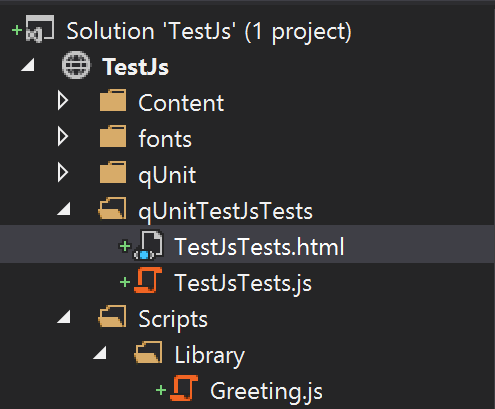
- I placed the unit testing artifacts in their own folder.

Figure 1 – Unit Test Folder Structure
- The bare minimum needed by QUnit in the TestJsTests.html file:
<!DOCTYPE html> <html xmlns="http://www.w3.org/1999/xhtml"> <head> <meta charset="utf-8" /> <title>Javascript Unit Testing Using QUnit</title> <link href="../qUnit/qunit-1.17.1.css" rel="stylesheet" /> </head> <body> <div id="qunit"></div> <div id="qunit-fixture"></div> <script src="../qUnit/qunit-1.17.1.js"></script> <script src="TestJsTests.js"></script> </body> </html> - Time to setup the test we know will fail. Adding code to TestJsTests.js. The idea is to define a class “Greeting” with two properties: “Id”, and “Title”. We will write our initial test, as if the class with these properties exists.
/// <reference path="../qUnit/qunit-1.17.1.js" /> /* globals QUnit, Greeting */ QUnit.test('Greeting Test', function(assert) { 'use strict'; assert.expect(2); var x = Greeting(1, 'Hello World'); assert.ok(x.Id === 1, 'Id property passed!'); assert.deepEqual(x.Title, 'Hello World', 'Title property passed!'); }); - As expected, the tests fail. (Note: there seems to be a layout bug in QUnit as we have a bit of runoff indicated by the blue arrow). This is good, we want it to fail so we can have a developer write the barest of minimum Javascript code needed to make the unit tests pass.

First Unit Test
- Proceeding with developing Greeting.js.

Greeting.js folder structure.
- Code for Greeting.js.
/* exported Greeting */ var Greeting = (function () { 'use strict'; var p = function (id, title) { this.Id = id; this.Title = title; }; return p; })(); - Updating the TestJsTests.html to include the Greeting.js code.
<body> <div id="qunit"></div> <div id="qunit-fixture"></div> <script src="../qUnit/qunit-1.17.1.js"></script> <script src="../Scripts/Library/Greeting.js"></script> <script src="TestJsTests.js"></script> </body> - And the unit tests pass!

Unit Testing Passes.
- In conclusion, we can now be confident that the code developed in Greeting.js is indeed good. With available unit test for our JS code, we can also confidently refactor our code. As the scope of the project grows, we can expand further on the behaviors expected of the code by writing further tests asserting the expected behavior. This can be valuable to the developers, as they can confidently develop code that causes the unit tests to pass.



JsHint
Ken brought my attention to this in July 2012. More in line with MS coding standards and assumes jQuery.
Douglas Crockford JavaScript coding conventions
Filed under: Coding Conventions | Tags: coding, Douglas Crockford
 Leave a comment
 Link to coding conventions: http://javascript.crockford.com/code.html
List of headings at the coding conventions site:
- JavaScript files
- Indentation
- Line Length
- Comments
- Variable Declarations
- Function Declarations
- Names
- Statements
- Simple Statements
- Compound Statements
- Labels
- return Statement
- if Statement
- for Statement
- while Statement
- do Statement
- switch Statement
- try Statement
- continue Statement
- with Statement
- White-space
- Bonus Suggestions
- {} and []
- , (comma) Operator
- Block Scope
- Assignment Expressions
- === and !== Operators
- Confusing Pluses and Minuses
- eval is Evil
JsLint, Missing ‘New’
I had these errors all over the place in JsLint. Did some looking into it.
It’s a matter of coding conventions. Whether I agree with the convention or not, the first letter of a function “capitalized”, is a convention floated by Mr. Crockford’s JsLint that such functions represent an object constructor (and in JS, functions are first-class objects).
IMHO, conventions are nice if followed or understood by most. From here on out I may follow this convention, but I’m not about to go through all my JS code and re-write. Caveat: unless I get paid to do so.
Since JS functions could be anything from plain-old subroutine, an object, an argument in another function, etc… I can see where some type of convention would help.
On the flip side, does it really matter? Wouldn’t the flavor of function being declared be implied in the context of the application in which it was declared? Sort of like the multiple meaning of some words in the English language, where meaning is understood in the context the word was used?
“use strict” in a function?
JsLint started to complain about using the “use strict” in a function form. What???
I found this Douglas Crockford posting from December 2010: “Strict Mode Is Coming To Town”
I was code testing delete Array[i]. Here’s a code sample that implements the recommendation, and passes JsLint:
(function () {
"use strict";
var myArray = ["one", "two", "three", "four"];
}());
So… if developing modules, from here on out, in the module file wrap it all up in a closure, and “use strict” will respect the scope of the closure, and not clobber up all the old stuff that is not ES5 ready… (I think it was referred to as “sloppy” co-mingled with “strict”)
 JavaScriptShadow